





Roku Streaming Media Player: Transform Your TV Experience 🎬📺
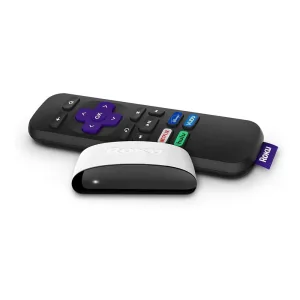
Elevate your entertainment experience with the Roku Streaming Media Player, a sleek and powerful device designed to bring the world of streaming right to your TV. Say goodbye to cable clutter and limited programming. Whether you’re a movie buff, a sports fan, or someone who loves binge-watching TV shows, Roku is your gateway to endless entertainment options.
Why Choose Roku? 🤔
Roku is known for its user-friendly interface, lightning-fast performance, and compatibility with nearly every streaming service. With the Roku Streaming Media Player, you gain access to thousands of channels, from popular platforms like Netflix, Hulu, Amazon Prime Video, Disney+, and YouTube to niche content providers, ensuring there’s always something for everyone.
Key Features:
- Compact Design: Fits effortlessly behind your TV for a clutter-free setup.
- Simple Remote: Intuitive remote with shortcut buttons for your favorite apps.
- High-Definition Streaming: Enjoy up to 1080p HD resolution with smooth playback.
- Roku Mobile App: Use your phone as a remote, cast content, or listen privately with headphones.
- Voice Control Compatible: Works seamlessly with Alexa and Google Assistant for hands-free navigation.
- Endless Content: Access thousands of channels, including live TV, news, movies, and kids’ shows.
Roku is perfect for anyone seeking affordable, high-quality streaming without the hassle of contracts or hidden fees. Its lightweight design and plug-and-play functionality make setup quick and straightforward—no technical skills required.
Stream Without Limits 🌐
With Roku, you are not confined to a single provider. You can explore content across various genres:
- Movies & TV Shows: Stream popular films and shows anytime.
- Music & Podcasts: Enjoy Spotify, Pandora, and more.
- Sports: Catch live games, highlights, and analysis from top networks.
- Kids & Family: Safe and engaging content for all ages.
Plus, Roku frequently updates its software, introducing new features and channels to enhance your experience.
Roku Streaming Media Player Specifications 📊
| Feature | Description |
|---|---|
| Resolution | Up to 1080p HD |
| Connectivity | HDMI, Wi-Fi 802.11 b/g/n |
| Remote | Standard Roku remote with shortcut buttons |
| Dimensions | 4.9 x 1.5 x 0.7 inches |
| Weight | 0.2 lbs |
| Voice Control | Compatible with Alexa and Google Assistant |
| Storage | Supports USB streaming and external storage |
| Popular Channels Supported | Netflix, Hulu, Amazon Prime, Disney+, YouTube, HBO Max, and more |
| Mobile App Features | Remote control, private listening, voice search, casting |
| Setup | Plug and play; connects directly to TV via HDMI |
How to Get Started with Roku 🚀
Setting up the Roku Streaming Media Player is a breeze:
- Connect the device to your TV via HDMI.
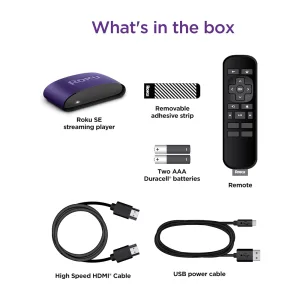
- Power it up using the included USB cable or power adapter.
- Follow on-screen instructions to connect to Wi-Fi.
- Sign in or create a Roku account to access thousands of channels.
Once set up, you’re ready to enjoy unlimited streaming with crisp HD visuals and immersive sound.
Expand Your Streaming Universe 🌟
Roku isn’t just about watching TV—it’s about customizing your entertainment. Use the Roku Channel Store to discover new apps, games, and channels. You can also link your streaming subscriptions, giving you one central hub for all your content. For movie lovers and sports enthusiasts, Roku offers curated recommendations based on your viewing habits, making sure you never miss your favorite shows.
Learn More & Explore Options 🔗
Want to explore Roku further? Check out these helpful external resources:
Upgrade your TV experience today with the Roku Streaming Media Player—compact, powerful, and designed for endless entertainment. With Roku, the future of streaming is in your hands! 🌟🎉


Reviews
There are no reviews yet.